
Design · Make
Sketch a small package net
Which folds and labels would another person need to understand the design?
Read a complete six-face cube net, identify neighbours and explain what a drawing leaves out of a real package.
15–25 minutes, or one face pair for a first try. More time is optional.
Start here
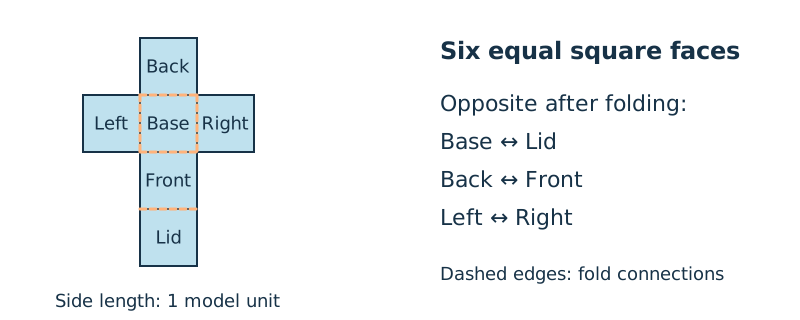
Use six equal square faces. In row 1 put Back; row 2 is Left, Base, Right; row 3 is Front; row 4 is Lid. The single faces line up with Base.
Use your idea or the example below. Talk, write, draw, point or listen first. You can stop after one step.
Try it your way.
Read the net
Use a top-to-bottom grid. Back is above Base, Front below Base and Lid below Front. Left and Right sit beside Base. Every face has side length 1 model unit.
Imagine the folds
Treat Base as the floor. Fold its four immediate neighbours up to form sides; Lid folds from Front over the opening. You can trace these changes without cutting or making anything.
Identify opposite faces
In the imagined cube, Base opposes Lid, Back opposes Front, and Left opposes Right. Adjacent on the flat net does not mean opposite in the cube.
Write a practical limit
The drawing shows face connections but no tabs, seam allowance, material thickness or tested closure. Label those as further design questions.
One possible version
Original net: six squares for a cube
The supplied positions define one constructed net. They are not a copied template or a manufactured package.
- Top row: Back above Base. Middle row: Left–Base–Right. Below: Front then Lid.
- All six faces are squares of side 1 model unit.
- Opposite pairs after folding: Base/Lid, Back/Front, Left/Right.
A valid face net is not proof of a practical package. Its seams, thickness, closure and suitability for any object are untested.
Something to keep?
Did I distinguish a flat neighbour from an opposite face in the folded shape?
You can keep a question, a sketch or a change of mind. A finished product is optional.
This opens an editable starter in your project tools. It asks before replacing open work. Choosing it does not save or share your work automatically.