
Music · Make
Write a graphic score legend
What must a reader know before a symbol becomes a musical instruction?
Give three symbols exact time meanings, then check whether someone could follow your score without guessing. Listening or making a sound is optional.
15–25 minutes, or one comparison for a first try. More time is optional.
Start here
Copy the symbols ○, △ and ·. Give ○ one beat of sound, △ two beats of sound, and · one beat of silence.
Use your idea or the example below. Talk, write, draw, point or listen first. You can stop after one step.
Try it your way.
Write a complete key
Read left to right. A symbol begins when the previous one ends. Both sound symbols can use the same imagined quiet tone; pitch and loudness are not specified by their shapes.
Trace the supplied score
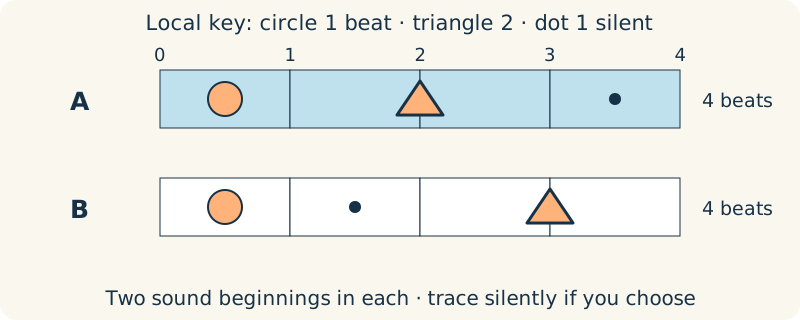
Read ○ △ ·. Mark boundaries at beats 0, 1, 3 and 4: circle from 0 to 1, triangle from 1 to 3, then silence from 3 to 4. No performance is needed.
Change one instruction
Try ○ · △ using the same key. It still lasts four beats, but the silence moves to 1–2 and the triangle now lasts 2–4. Explain the difference by pointing, drawing or writing.
Check what remains open
Choose one detail your key leaves free, such as the imagined sound. If exact agreement matters, add one instruction and check the score again.
One possible version
One key, two four-beat scores
This is an original local notation, not a standard musical convention.
- A: ○ △ · means sound for 1 beat, sound for 2 beats, then silence for 1 beat: 1 + 2 + 1 = 4. It has two sound beginnings.
- B: ○ · △ also totals 4 beats. Its silent beat falls earlier, so equal total duration does not mean identical timing.
- A reader can trace either score silently. The key does not claim that a triangle always has this meaning in other music.
A precise timing key need not specify every sound quality. Our diagrams do not record an actual performance.
Something to keep?
Which information came from my key, and which detail did I leave for a reader to choose?
You can keep a question, a sketch or a change of mind. A finished product is optional.
This opens an editable starter in your project tools. It asks before replacing open work. Choosing it does not save or share your work automatically.