
Astronomy · Explore
Read a Moon-phase model
What can a labelled paper model explain about the Moon's changing appearance?
Read a space-view model to explain how our view of reflected sunlight changes as the Moon moves.
10–20 minutes, or one explanation for a first try. More time is optional.
Start here
In the supplied model sunlight comes from the left. Mark the Sun-facing half of each Moon as illuminated, wherever the Moon is placed.
Use your idea or the example below. Talk, write, draw, point or listen first. You can stop after one step.
Try it your way.
Separate light from viewpoint
The Moon reflects sunlight. In this simple model its Sun-facing half is lit. That is different from how much of the lit half an observer on Earth can see.
Compare two positions
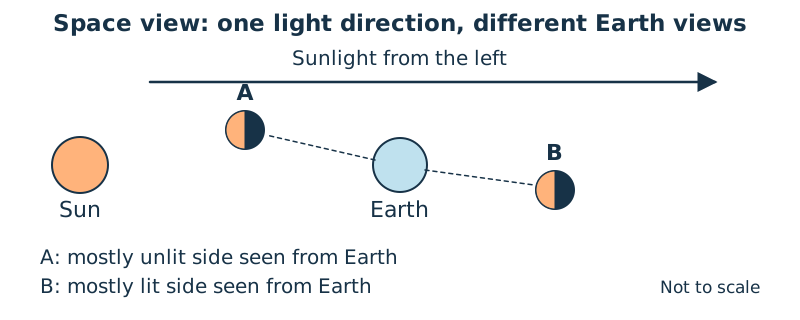
At A the Moon is on the Sunward side of Earth, so Earth sees mostly its unlit side. At B it is on the far side, so Earth sees mostly its lit side. Trace a line of sight from Earth.
Name what ordinary phases mean
Explain the change using viewpoint and reflected light. Ordinary phases are not caused by Earth’s shadow; that is a different eclipse situation.
Add an honest label
Label the drawing ‘space view, not to scale’. Its staggered positions are schematic; it does not show a real eclipse alignment, a date or how a phase is rotated in the Australian sky.
One possible version
Constructed space view: one light direction
The sketch places two possible Moon positions around one Earth. They are comparisons, not two Moons present at once.
- Sunlight travels from left to right; the left half of both Moon symbols is lit.
- A is on the Sunward side: the Earth-facing view contains mostly unlit surface.
- B is on the far side: the Earth-facing view contains mostly lit surface.
The sketch omits orbital tilt, scale, dates and sky orientation. It explains a relationship, not tonight’s phase or an eclipse prediction.
Something to keep?
Did I keep the illuminated half separate from the part visible to the observer?
You can keep a question, a sketch or a change of mind. A finished product is optional.
This opens an editable starter in your project tools. It asks before replacing open work. Choosing it does not save or share your work automatically.