
Art · Make
One doorway, two possibilities
How much can one line choice change the way an image is read?
Draw an imaginary scene twice, change one visual choice and separate what you can see from what you interpret.
10–20 minutes, or one small sketch for a first try. More time is optional.
Start here
Draw a rectangle for a doorway, a circle for its window and a triangle above it. A rough version is enough.
Use your idea or the example below. Talk, write, draw, point or listen first. You can stop after one step.
Try it your way.
Keep a reference
Draw the same three shapes again beside the first scene. Keep their positions and sizes similar so you can explain what changes. You can use the supplied example throughout.
Change one choice
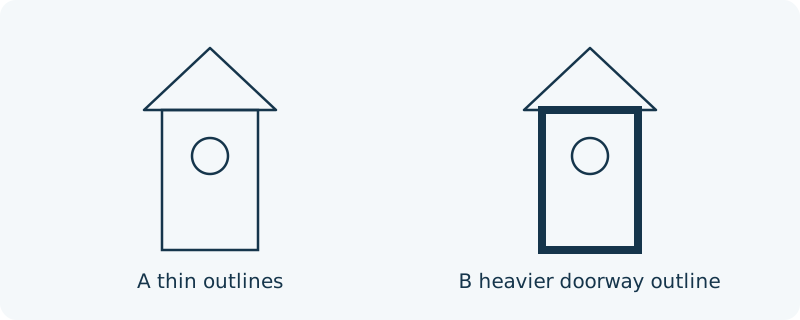
Use thin outlines in version A. In version B, make only the doorway outline heavier by tracing it again. Keep the circle and triangle thin. You may choose another single change instead, such as spacing, if you name it.
Describe, then interpret
Write or say one visible difference: ‘The doorway outline is thicker.’ Then offer one possible reading: ‘It draws my attention to the entrance.’ Someone else may interpret it differently.
Choose what to keep
Keep either version, combine an idea or leave both unfinished. If you want feedback, ask a precise question such as ‘What catches your eye first?’ No sharing is required.
One possible version
Original example: an imaginary doorway
This is an invented design comparison, not a report of audience responses. A and B contain the same rectangle, circular window and triangular roof in the same positions.
- A: all three outlines are thin.
- B: only the doorway outline is heavier.
- Visible change: line weight. Possible interpretation: the doorway attracts more attention.
A different reading is possible. These drawings do not establish how every viewer feels, or that one version is better.
Something to keep?
Which part was a visible change, and which part was my interpretation?
You can keep a question, a sketch or a change of mind. A finished product is optional.
This opens an editable starter in your project tools. It asks before replacing open work. Choosing it does not save or share your work automatically.